


Next: About this document ...
EXPERIMENT 2.
NETWORK ANALYSER and a 3D-ELECTROMAGNETIC SIMULATOR
Network analyser
Network analyser(NWA) is an instrument used for measuring
scattering parameters (S-parameters) of passive and active microwave
devices. Two broad classes of network analysers exist, namely scalar
and vector network analysers. Scalar network analyser can only
measure the magnitude of S-parameters but vector network analyser can
measure both phase and magnitude of S-parameters. Fig. 1 shows how a network
analyser can be used for measuring scattering parameter  of an
arbitrary device under test (DUT).
of an
arbitrary device under test (DUT).
Figure 1:
S-parameter measurement using Network analyser.
 |
Standing Wave Ratio (SWR) and Group Delay are examples of other
parameters (other than S-parameters), which can be measured
using a network analyser. In this lab we will find experimentally,
1) S-parameters of a circulator and
2) Standing wave ratios (SWR) on a coaxial cable.
using the Wiltron-360 network analyser.
Wiltron-360 network analyser is a vector network analyser made
by WILTRON and it has 3 basic building blocks,
1)source 2)test set and 3)network analyser
The signal source provides the stimulus to the DUT. The frequency
range of the source and the test set establishes the frequency range
of the vector network analyser. The test set is a 2-port instrument
that samples the incident reflected and transmitted signals. The
transmitted signal is alternated between port 1 and port 2 . It internally
converts recieved signal to a lower IF signal that retains the phase and
magnitude relation of the original signal. The network analyser
analyses the IF signals from the test set for phase and magnitude
data which are presented on the display.
Measurements are made by comparing the relative magnitude and phase
changes between the signal incident to the DUT and reflected or
transmitted signal from the DUT.
One of the important steps before starting the measurement is Calibration. Purpose of calibration is to remove systematic errors
during measurements by means of standards. Standardized components used for
a typical calibration are open, short,thru and a broad band load.
The Lab-instructor will show the calibration kit of the network
analyser and show the different calibration standards used for
calibration.
Since the exact calibration procedure is elaborate and beyond the
scope of this lab, you will not do the calibration. However for your
measurements, you have
the option of using the calibration data from a floppy diskette.
Complete the following tasks.
Task A) Find the S matrix of the given circulator using network
analyser for three different frequencies in X-band (8-12GHz).
- Step-1)Recall Calibration data from floppy diskette
In calibration panel of NWA press the following keys in sequence,
Save/Recall :: Recall :: Calibration data from disk :: filename
Instructor will tell you the required file name where calibration data
is stored.
- Step-2)Adjust channel display properties.
Press following keys in sequence,
Channel-menu :: All 4 channels
Adjust,
Graph-type :: Log Magnitude-Phase
for all the four channels
- Step-3) Measure the S-parameters of the circulator.
For doing this connect port 1 of network analyser to port i of
Circulator and port 2 of network analyser to port j of
Circulator. Connect matched load at the remaining port of Circulator.
Adjust,
Marker-menu::Marker 1 ON::Read out marker
Adjust the marker to 3 different frequencies of interest and read
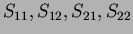 from the 4 channels (both
magnitude and phase)
from the 4 channels (both
magnitude and phase)
Complete the procedure for i=1,2,3, j=1,2,3 so that the full
S-matrix of Circulator can be calculated .
(Covert dB into ordinary scale and write S-parameters in
Magnitude-Angle form.)
1) Frequency =-----GHz.



2) Frequency =-----GHz.
3) Frequency =-----GHz.
- Answer the following questions
A-1)Explain briefly how a circulator work and write two applications.
A-2)Compare your results with the S(matrix) of an ideal circulator and
explain why practical S(matrix) is different from ideal case.
Task-B)Using network analyser, for the given coaxial cable determine the standing wave
ratios for frequencies from 1-10GHz (matched load conditions).
In the network analyser front panel,
- Step-1)Adjust the frequency sweep to 1-10GHz
- Step-2)Adjust channel properties to single channel
- Step-3)Adjust Graph type to SWR.
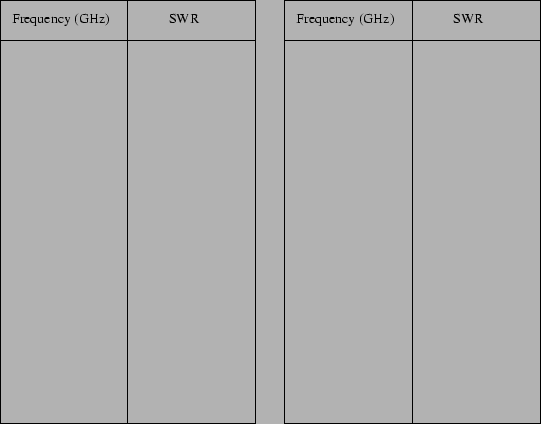
Tabulate your readings.
B-1)From your observations suggest an operating region for best performance.
A 3D-electromagnetic simulator
Currently a number of electromagnetic simulators are available in
market which have already become part and parcel of microwave
industry. Coupled with powerful computers, these simulators can be
used for designing and optimizing electromagnetic structure of any complexity in least possible
time. Many of these simulators support visualization of
electromagnetic fields which helps an experienced designer in his designs.
Electromagnetic simulators commercially available can be divided
broadly into two classes namely 2D and 3D simulators. 2D-simulators can only be used for
simulating planar structures for eg. microstrip and coplanar
structures in multilayers or single layers (An eg. of such a
simulator is MOMENTUM). 3D simulator can simulate 3D-structures like
cavities, wave guides, horn antennas etc.
Let us have a look at one simulator available in our laboratory,
namely High Frequency Field Simulator (HFSS) from Hewlett
Packard which is a 3-D electromagnetic simulator. This simulator is
mathematically based on a technique called Finite Element Method (FEM).
For using HFSS, there are three broad phases,
1. Drawing phase, where we draw the complex electromagnetic structure,
specify the materials etc.
2. Boundary definition phase, where we define various boundary
conditions of the structure.
3. Simulation phase, where we set up FEM-mesh, frequency for which
simulation is needed etc. and then the final simulation.
Typical memory requirement for a standard simulation is 250MB RAM
which grows with the complexity of the structure. In our laboratory
HFSS simulations are currently run under 550MB RAM. Time taken for the
simulation depends on processing speed of computer and complexity of
the electromagnetic structure.
Let us use the HFSS simulator to view electromagnetic
fields in a rectangular wave guide.
Task-C) 3-D view of  mode fields and standing waves
in a rectangular wave guide.
mode fields and standing waves
in a rectangular wave guide.
This project has already been set up and simulated for you and the
window you see is the drawing window (try to study the various keys of
this window)
- A) mode fields,
A-a)Study of E-fields,
From drawing window, go to the post processor of the HFSS simulator.
For doing this click the following keys of the simulator,
A-a-1) POST :: POST-PROCESSOR(OK)
A-a-2)In the Post-processor window,
PLOT::PLOT FIELD-DATA
Plot=E :: Plane=XZ :: Arrow-density=fine
A-b) Study of H-fields,
Erase the E-fields for clarity,
WINDOW :: ERASE
Repeat (A-a) with the following difference,
A-a-2) PLOT :: PLOT FIELD-DATA (Plot=H :: Plane=XY :: Arrow-density=fine)
- B) Standing waves
Go to the project where a shorted wave guide is constructed,
Note the difference in the drawing (here a short is drawn at one end)
Repeat all the steps mentioned in (A) and study the difference
of fields of (B) from (A) by carefully observing the E and H plots.
Next: About this document ...
Dhanesh Gopinatha-Kurup
2000-09-27